If you spend more than 8 hours a day working at your computer, wrist pain isn’t just an annoyance—it’s a warning sign. Standard computer mice force your forearm into an unnatural twisted position, leading to strain, fatigue, and repetitive strain injuries (RSI) like Carpal Tunnel Syndrome.
Switching to an ergonomic mouse is the easiest and most effective way to eliminate wrist pain and upgrade your workspace comfort.
In this guide, we reviewed and compared the 5 best ergonomic mice available on Amazon in 2026 based on comfort, angle, and value to help you find the perfect match.
| Product Name | Type / Design | Best For | Price Range | Link |
| Logitech MX Master 3S | Sculpted standard | Power users & productivity | $86.99 – $97.88 | Check Price |
| Logitech Lift | Vertical (57° angle) | Small to medium hands | $59.99 – $79.99 | Check Price |
| TECKNET Vertical | Vertical | Budget-conscious buyers | $21.95 – $24.99 | Check Price |
| Kensington Pro Fit | Vertical trackball | Limited desk space | $37.97-$39.99 | Check Price |
| Logitech MX Vertical | Vertical (57° angle) | Large hands & mac users | $69.86 – $74.93 | Check Price |
1. Logitech MX Master 3S — Best Overall Ergonomic Mouse
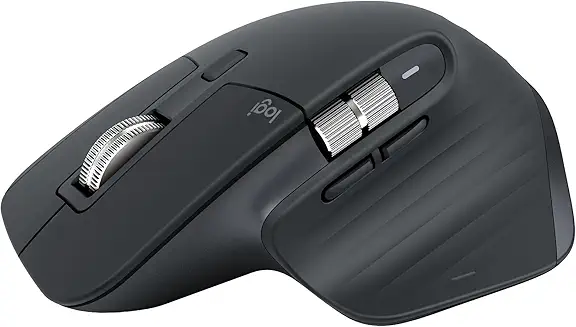
The Logitech MX Master 3S is widely considered the gold standard for office professionals and creators. While it looks closer to a traditional mouse, its sculpted shape features an integrated thumb rest and a subtle tilt that drastically reduces wrist muscle strain during long shifts.
- What We Loved: Ultra-quiet clicks; electromagnetic MagSpeed scrolling wheel; incredible 8K DPI tracking on any surface (including glass); long-lasting USB-C rechargeable battery.
- Drawbacks: Premium price point; built strictly for right-handed users.
- Best For: Remote workers who want top-tier productivity, seamless multi-device switching, and premium wrist support.
2. Logitech Lift Vertical Ergonomic Mouse — Best for Small to Medium Hands
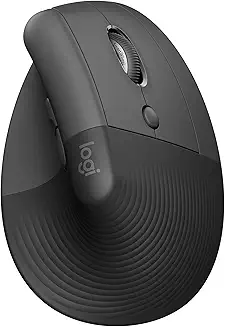
Most vertical mice are too bulky for smaller hands, leading to more muscle strain. The Logitech Lift solves this problem perfectly. Its unique 57-degree vertical design places your hand in a “natural handshake position,” instantly removing pressure from your carpal tunnel.
- What We Loved: Perfect compact size for smaller hands; silent click buttons; textured rubber grip feels comfortable; available in a dedicated left-handed version.
- Drawbacks: Powered by a single AA battery instead of USB-C recharging.
- Best For: Anyone with small-to-medium sized hands experiencing immediate wrist fatigue from flat office mice.
3. TECKNET 2.4G Ergonomic Wireless Vertical Mouse — Best Budget Pick
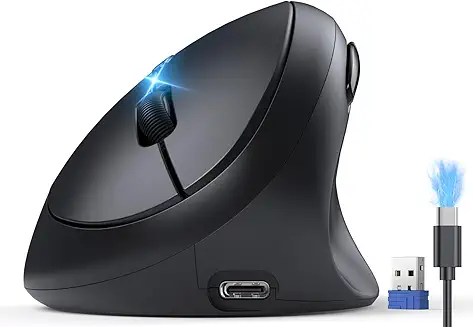
You don’t need to spend a fortune to get immediate pain relief. The TECKNET Vertical Wireless Mouse is the ultimate budget-friendly entry point. It features a steep 60-degree shark-fin angle that keeps your arm in a healthier alignment at a fraction of the cost of premium brands.
- What We Loved: Extremely affordable ($19.99); very comfortable thumb rest; reliable 2.4G wireless connection with USB dongle; adjustable DPI up to 4800 for smooth tracking.
- Drawbacks: Lightweight plastic construction feels less premium than high-end Logitech models; no horizontal scroll wheel.
- Best For: Beginners who want to test if a vertical mouse solves their wrist pain without a massive upfront financial investment.
4. Kensington Pro Fit Ergo Vertical Trackball — Best for Severe Wrist Pain
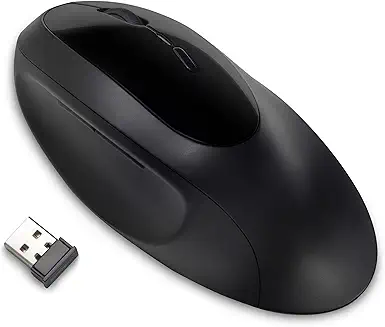
If moving your arm or elbow at all causes sharp pain, a trackball mouse is the ultimate medical solution. With the Kensington Pro Fit, your wrist stays completely stationary on the desk. You control the cursor using only your thumb on the smooth trackball, entirely eliminating wrist movement.
- What We Loved: ZERO arm movement required; features a comfortable 60-degree ergonomic tilt; easy-to-clean ejectable trackball.
- Drawbacks: Takes a few days to get used to trackball navigation; thumb can feel slightly tired during the first week.
- Best For: Users suffering from severe carpal tunnel or desk workers with very limited physical desk space.
5. Logitech MX Vertical — Best for Large Hands & Maximum Relief
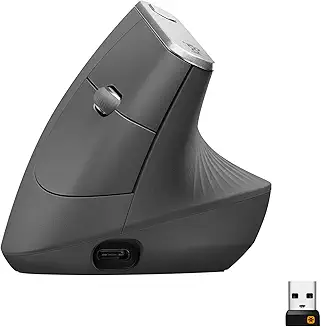
If you have larger hands and want a premium vertical mouse experience, the Logitech MX Vertical is your answer. Just like the Lift, it features a 57-degree vertical tilt, but its larger form factor ensures that big hands can rest completely without trailing on the desk.
- What We Loved: Fast recharges via USB-C; great ergonomic fit for larger hands; advanced optical tracking button on top to change cursor speed instantly.
- Drawbacks: Bulky design makes it less ideal for travel; premium price.
- Best For: Remote workers with larger hands looking for a premium, durable, and rechargeable vertical mouse.
Buying Guide: How to Choose the Right Ergonomic Mouse
Before purchasing on Amazon, consider these three quick factors:
- Hand Size: Measure your hand from the base of your palm to the tip of your middle finger. If it’s under 6.7 inches, go with the Logitech Lift. If it’s over, choose the MX Master 3S or MX Vertical.
- The Ergonomic Angle: Vertical mice with a 57 to 60-degree angle offer the best scientific relief for wrist tension and forearm pronation.
- Trackball vs. Standard: If wrist movement hurts, choose a trackball. If you prefer traditional navigation but want maximum comfort, choose a vertical or sculpted mouse.